And yet, ASA remains an overlooked, misunderstood, and underused platform. Many advertisers cite budget constraints, confusing keyword matching, and a poor understanding of the search journey through the platform as reasons to avoid it.
In this brief guide, we'll break down how Apple Search Ads works and outline strategies to help you make the best use of its user acquisition potential.
What is Apple Search Ads—A Refresher
Apple Search Ads is Apple's paid advertising platform made for app promotion within the App Store. It allows brands to appear at crucial moments in a user's journey—before a search, during a search, or while exploring other apps—inside the store.
These placements provide you with numerous opportunities to connect with prospective users at various stages of their journey, from top-of-the-funnel discovery to bottom-of-the-funnel purchase moments.
The platform uses a combination of precise targeting options, budget control, and insights that can help you increase your downloads and purchases.
Apple Search Ads vs. UA Channels — Z2A Digital
UA channel comparison
Apple Search Ads vs. the rest of the UA stack
Where ASA earns its place in the mix — and where the other channels still do the heavy lifting.
← Swipe to see all columns →
Dimension
Apple Search Ads
Google Ads (UAC)
Meta Ads
TikTok Ads
Reddit Ads
User intent
✓Highest — user is actively searching the App Store to install something
Mixed — Play Store search intent plus broad Search/YouTube/Display reach
Low — interruptive discovery, no active search signal
Low — algorithmic discovery via For You feed
Medium — contextual, driven by subreddit/community relevance
Privacy resilience
✓Native — runs on Apple's own AdServices data, no IDFA or MMP dependency required
Moderate — GAID-based, some ATT/iOS signal loss on cross-platform campaigns
Weakest — heavily reshaped by ATT, relies on Aggregated Event Measurement modeling
Weak — same ATT exposure, uses its own modeled attribution API
Moderate — smaller footprint means less historical dependency on IDFA
Placement moment
✓The exact moment of decision — top of App Store search results
High — constant creative refresh needed to fight fatigue
High — native, trend-responsive video required
Medium — native-feeling copy and imagery per community
Typical scale
Limited to App Store search volume — not a volume play
Largest available inventory across Google's ecosystem
Very large — broadest audience pool
Large, concentrated in younger/emerging-market users
Smaller, but highly targeted by vertical
Z2A Digital
Advantages of Apple Search Ads for Advertisers
Boasts the highest-intent placement among all mobile UA channels.
No IDFA, no MMP dependency on core measurement, thanks to its own first-party data platform.
Minimal creative lift due to its matching/auto-generation capabilities using your existing App Store listing (no creative team or fatigue cycles to contend with).
Built-in competitive defense allowing you to bid on your own branded terms.
Transparent, auction-based CPT, which translates to paying for a keyword, not a modeled outcome.
Apple Search Ads: Basic vs. Advanced — Z2A Digital
Apple Ads tiers
Apple Search Ads Basic vs. Advanced
Same platform, two very different levels of control. Here's what changes between tiers.
← Swipe to see all columns →
Dimension
Basic
Advanced
Setup
Automated — set a budget and Apple manages the rest
Manual — build campaigns, ad groups, and keyword lists yourself
Pricing model
Cost-per-install (CPI) — you only pay when someone installs
Cost-per-tap (CPT) — you pay per tap, in a second-price auction
Placements
Search Results only
All four: Search Results, Search Tab, Today Tab, Product Pages
Keyword control
None — Apple selects keywords automatically
Full — choose exact match, broad match, or Search Match per ad group
Budget ceiling
Capped at $10,000 per app, per month
No cap — scales with account and budget
Negative keywords
Not available
Available — needed to stop campaigns bidding against each other
Custom product pages / ad variations
Not available — one default ad only
Available — build variations tied to specific keywords or audiences
Reporting depth
High-level install and spend data
Keyword-level taps, conversions, Share of Voice, and CPA
Management time
Minimal — roughly 80% less hands-on time than Advanced
Ongoing — ad groups, bids, and negatives need regular attention
Best for
Small teams, new apps, or a low-effort starting point
Any brand that wants to control targeting, defend brand terms, or scale spend precisely
Z2A Digital
An important distinction to note with Apple Search Ads is that it comes in two versions: Apple Search Ads Basic and Apple Search Ads Advanced. Understanding them can help you choose the best setup for your campaign needs.
How Does Apple Search Ads Basic Work?
Apple Search Ads Basic is built for simple use. It's ideal for small business owners and solo developers. The workflow is simple too: select your app, choose your target regions, and set your budget. The platform automatically handles your ad creation and helps your ad appear in searches relevant to your audience (automated matching). It also provides a suggested max CPI based on your app's specifics and competitive benchmarks.
How Does Apple Search Ads Advanced Work?
Apple Search Ads Advanced was built to provide full control and flexibility, making it the best choice for large teams and marketers. You can choose where your ads appear, manage your own keyword terms, and customize your bids for optimal performance. With Apple Search Ads Advanced, you can run multiple ad placements, create custom product pages, and receive detailed reporting on metrics such as impressions, taps, and conversions.
Debunking Common ASA Myths
Despite the advantages and simplicity of Apple Search Ads, some myths still persist, which has made the platform somewhat enigmatic to advertisers. But they need to be demystified once and for all.
Myth: ASA is too small to matter. Audiences may be smaller, but they're already looking to download something. This high intent converts significantly higher than reaching a broader audience that's only scrolling.
Myth: It's just paying for your own brand name. This is false. You can also bid on competitor names and category terms, which reels in new users who weren't searching for you directly.
Myth: You need Advanced tier and heavy creative investments to see results. Also not true. The basic version of ASA runs automatically off your current App Store listing data, eliminating the need for ad creative to get started.
Myth: You can't really tell if it's working. You can definitely tell if ASA ads are working, because Apple's reporting shows you precisely which keyword led to specific taps and installs. There's no modeling or guesswork involved.
Myth: Apple's privacy changes hurt ASA the same way they hurt Meta and TikTok. Privacy changes don't hurt ASA performance the same way. Those changes were designed to prevent outside companies from tracking users across different apps. ASA operates as Apple's own advertising channel within its own App Store, so it was never dependent on the cross-app tracking those changes restricted.
Myth: ASA only works for big, mainstream apps. ASA can work for niche apps when done right. Someone who searches a specific keyword already knows what they're looking for, and these searches usually draw less competition, meaning niche apps can increase visibility via the platform.
With these myths out of the way, we can dive into the different types of ad formats the platform uses, how they work, and how they can benefit you.
Apple Search Ad Formats
Apple Search Ads currently runs placements across four formats: Today Tab ads, Search Tab ads, Product Page ads, and Search Results ads. Each has its own strengths and ideal use cases.
Here at Z2A Digital, we group them into two main categories: Impact Formats, which consist of Today Tab ads, Search Tab ads, and Product Page ads, and Intent Formats, under which Search Results falls.
Impact Format
With Impact Formats, the focus is on creating visibility before explicit search intent arises. These ads aim to push your brand's discoverability to the maximum, so that users can see you before they even choose you.
Today Tabs
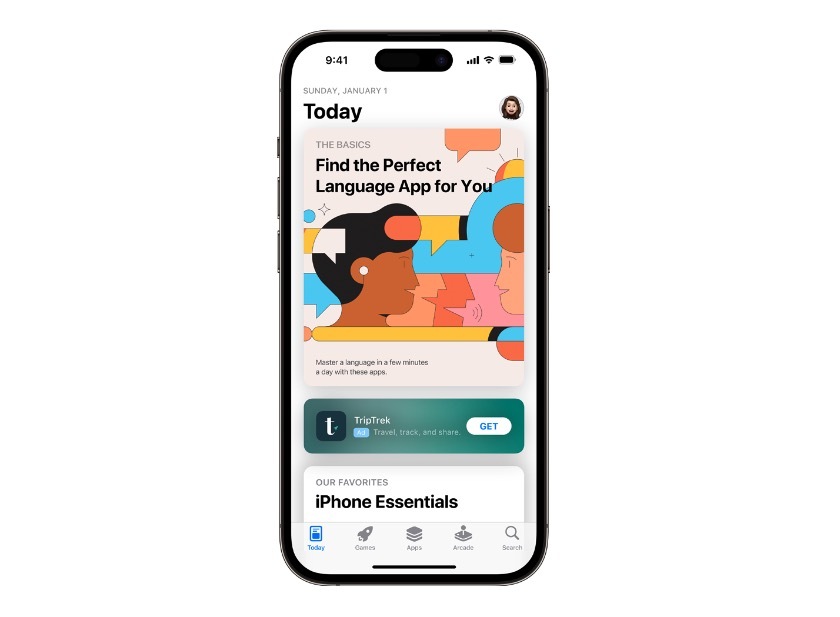
Description—A featured card on the App Store home page (Today), displayed with a large, visual-forward presentation and animated creative.
Ideal Uses—Today Tab ads are ideal for app companies that can allocate more spend toward creative and branding—typically brands that already have strong recognition, or those that want to build awareness fast.
Search Tabs
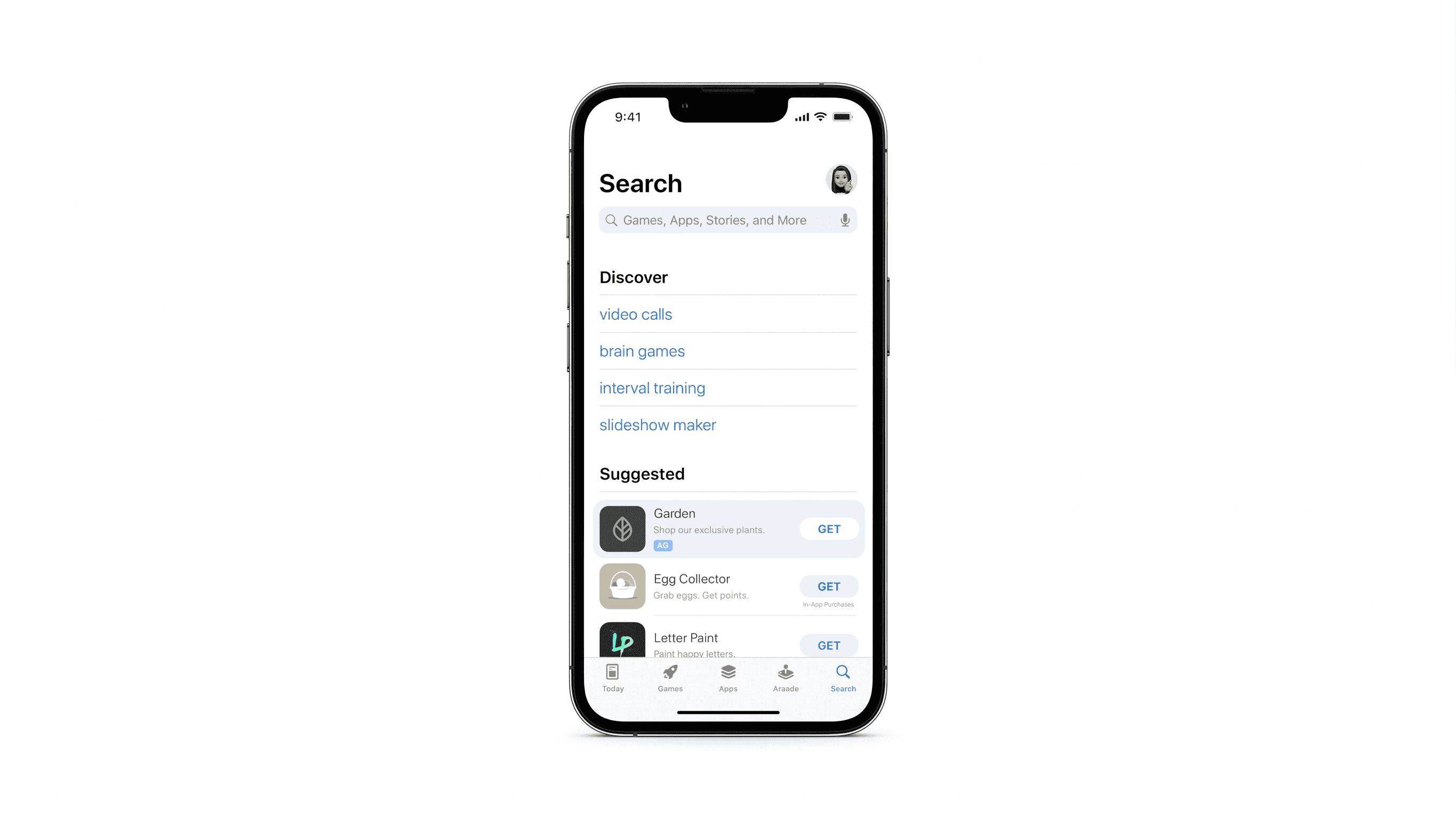
Description—A menu that appears before a user searches, at the top of the search tab, in the "Suggested" list.
Ideal Uses—Apps that want visibility before users decide to search. It's ideal for building awareness for lesser-known brands, or reinforcing an already established one.
Product Pages
Description—Appears in the "You Might Also Like" section of competitor or related apps.
Ideal Uses—App brands that want to draw users from competitors, especially those operating in categories with similar, well-established apps.
Intent Format
With Intent Formats, the focus is on serving users who have already decided what they want, and concentrating most of the investment on these users.
Search Results
Description—Appears at the top of the results once a user has typed a search.
Ideal Uses—Apps that want to capture users at the exact moment of purchase-ready intent. This is the format for bottom-funnel conversion, and it's essential for defending branded searches and competing for high-intent category terms.
With these formats detailed, we'll highlight some best practices for ASA, including how to incorporate these formats into your strategy.
Best Practices for ASA Campaign Optimization for All Verticals
Every brand will approach Apple Search Ads slightly differently, since audiences and markets differ. That said, there are best practices for 2026 that all app marketers can use, regardless of vertical. These tips span the full gamut of advertising on the platform, from budgeting to targeting and more.
Fix your metadata before you spend a single dollar. Optimize your app name, subtitle, and keyword field before launching anything. Apple's matching algorithm sources directly from these fields to determine which searches your ad qualifies for, so weak metadata undermines the campaigns you build on top of it.
Structure by intent, not convenience. Set up four separate campaigns: brand, category, competitor, and discovery. Don't lump keywords into one account, as each campaign type targets a different user at varying points in their journey. Separating them makes performance easy to analyze and optimize on its own terms.
Give each placement its own campaign. Run each ad placement/format (Search Results, Today Tab, Search Tab, and Product Pages) as its own campaign, with its own budget and success metric. Each one reaches users in a different buyer stage and mindset, so splitting them makes the intent structure from the previous step work more effectively in practice.
Use one keyword theme per ad group. Group keywords by theme within each campaign instead of mixing unrelated terms together. This keeps bidding and ad relevance connected, and it's the level of granularity where true optimization occurs.
Start with exact match, not broad match. Build your core campaigns with exact matches, use pre-validated keywords, and save broad match or Search Match specifically for testing new terms. Broad match on Apple Ads usually pulls in loosely related, difficult-to-manage traffic, so it shouldn't sit in your core campaigns.
Use Discovery campaigns as a keyword-mining tool, not a permanent home. Let Discovery and Search Match reveal new search terms you haven't targeted yet, then shift any term that proves it converts into the most appropriate exact-match campaign. Discovery should feed your other campaigns, not retain proven keywords forever.
Negate aggressively across campaigns. Exclude branded terms from all campaigns except your Brand one once your Category, Competitor, and Discovery campaigns go live. Without this, you could inadvertently bid against yourself and increase your own Cost Per Tap (CPT) unnecessarily.
Always run a brand campaign, even if you think you don't need to. Run a Brand campaign whether your app is established or not. As of March 2026, Apple began displaying two ads per search query, meaning competitors can now appear right above your organic listing on your own brand name.
Track Share of Voice, not just ROAS. Verify how much of the available traffic you're capturing on your top keywords, not just your cost-per-result, once campaigns have launched. Many advertisers assume their bid is high enough at 30% Share of Voice, while competitors are silently taking the other 70% of profitable traffic.
Measure beyond the install. Connect your campaigns to an MMP or AdAttributionKit to observe what happens after a download (i.e., trial starts, paid conversions, LTV). Apple's platform stops reporting at the install, so without additional tracking, you'll be optimizing only toward cheap installs rather than users who actually pay.
Use custom product pages and ad variations, not just the default. Build ad variations and custom product pages tied to particular keyword themes or audiences once your structure and keywords are set up, rather than depending on default, auto-generated ads. This step improves tap-through and conversion rates on the traffic you're already winning.
Apple Search Ads: An Underrated Powerhouse Platform
Apple Search Ads is a not-so-secret tool that may very well belong in your toolkit. It offers you access and reach that few other UA channels can match, along with a direct connection to users at the precise moment they've chosen to download. It's also supported by measurement that doesn't fall apart when platform privacy policies change.
The formats give you several ways to reach your intended audience, from establishing visibility before they search to capturing them the instant they do search.
What also makes Apple Search Ads special is that it doesn't require a substantial budget or a dedicated creative team to begin—just a structure that aligns with how the platform works.
With the right setup, ASA can serve as a channel that boosts UA without the challenges of other platforms.
Ready to discuss how Apple Search Ads can serve your user acquisition goals? Get in touch with us today.
Jacob Karas
I enjoy empowering good sales people to become great sales people leveraging traditional and non-traditional methodologies.


.png)
.png)

.png)

%20(3).webp)